Showing posts with label eAudio. Show all posts

Tuesday, December 29, 2015

Top 10 OverDrive Support Questions This Holiday Season

With many people receiving new devices this holiday season, more patrons will be using East Central Regional Library's OverDrive-powered Digital Library for eBooks and eAudiobooks. With new users in mind, we've listed some frequently asked questions below:

How do I return digital titles?
Find information for this is on OverDrive Help in the article about returning titles before the lending period expires. From there, you’ll find links to steps for returning titles from specific devices or software.

How to merge library card accounts
OverDrive has added the ability to retain OverDrive checkouts, holds, and other account activity when you switch library cards (for example, if you lose your original card and are issued a replacement). If you were issued a new library card, and would like your OverDrive activity transferred, please email ecregion@ecrlib.org so that we can merge your records.

How to reset a download link
If you attempt to download a digital title too many times, you may encounter an error. When this occurs, we can reset the download link for the title. Please email ecregion@ecrlib.org to do so, explaining the problem.

What to do if the OverDrive app is not working
You can find basic step-by-step instructions to troubleshoot the OverDrive app on mobile devices in the help article. These are good first steps to resolve many issues!

Can I renew digital titles from my library?
Renewing digital titles works a little bit different than renewing physical titles. Learn how to can renew digital titles or request them again.

Will my device work with OverDrive?
This is the time of year when many people give or receive new devices that they then use with OverDrive.  If you are not familiar with your new device, the best place to start is the Device profiles on OverDrive Help. Here you can find information on the most popular devices and platforms and learn how they can be used with OverDrive. Each profile will recommend software or apps, compatible formats, steps on getting started, and more.
In order to protect users’ privacy, OverDrive requires each user to verify their account. 

This error occurs when you try to open an eBook that you’ve already downloaded to another device, and that device was authorized with a different OverDrive account, library card, or Adobe ID. To see what steps are needed to resolve this, please check out this help article. You can also check out the article about downloading the same eBooks to multiple devices, which could help prevent this error.

Can I recommend digital titles?
You can recommend titles that aren’t in ECRL's collection. Learn more about recommending titles. 

What are the maturity levels I can choose from on my library site?
Maturity levels allow you to exclude content categorized under certain “maturity levels” that you may not want to see while browsing and searching a digital collection. 

Remember, OverDrive Help is available 24/7 and is a great resource for answering these or similar questions!

(Adapted from the OverDrive Library Blog)

Sarah Hawkins, Resource Librarian

Monday, June 8, 2015

Digital Summer Reading (June 9 – 23, 2015)

June marks the official beginning of summer, which means long hours spent soaking up sun beside the pool, cutting the grass on warm evenings, and going on road trips to wondrous destinations. Why not spend these nostalgic summer activities enjoying a great read from the Digital Library?  

Big Library Read is back from June 9-23, 2015 with a suspense novel by Kate White,  Eyes on You. Big Library Read connects readers around the world who read the same eBook and eAudiobook at the same time. During the last Big Library Read in March, 54 East Central Regional Library users checked out the eBook How Shakespeare Saved My Life in a two-week span! 

From June 9-23, 2015, Eyes on You is available for checkout through ECRL's Digital Library. It’s available in eBook and eAudiobook (don't forget that June is Audiobook Month which celebrates a love of listening!), free, and there’s never a waiting list during the program. All you need is your library card and password.


Eyes on You by Kate White

A breathless psychological thriller that will leave you guessing until the very end
After a painful divorce and losing her on-air job two years ago, Robin Trainer has fought hard to regain her career. Now, as the popular cohost of a nightly entertainment show and the author of a hot new bestseller, she’s being dubbed a media double threat. In a business full of rivals eager to see you fail, making a comeback was tough, and Robin isn’t about to do anything that could jeopardize her newfound success.

But suddenly things begin going wrong. A few small but nasty incidents shake her confidence: a vicious note tucked into her purse at her book signing; the photo on her book jacket slashed in her office… Soon the meanness turns threatening. Someone has eyes on Robin, an adversary with a dark agenda who wants to hurt her and see her fall, and the clues point to someone she works with every day.

As she frantically tries to put the pieces together and unmask an enemy hiding in the shadows all too close to her, it becomes terrifyingly clear that the person responsible isn’t going to stop until Robin loses everything that matters to her . . . including her life.

Read the eBook
Listen to the Audiobook


Meet Kate White

Kate White, the former editor in chief of Cosmopolitan magazine, is the New York Times bestselling author of the stand-alone novels Hush, The Sixes, and Eyes on You, as well as the Bailey Weggins mystery series. She is editor of The Mystery Writers of America Cookbook. She is also the author of popular career books for women, including I Shouldn’t Be Telling You This: How to Ask for the Money, Snag the Promotion, and Create the Career You Deserve. You can contact her or learn more about her at katewhite.com.


USA Today says, “Kate White keeps up the pace by adding a little more suspense and a little more danger from beginning to end.” What do you think?  Come back after you've read and share your thoughts or join the conversation on Twitter and Facebook with the hashtag #BigLibraryRead.


Sarah Hawkins, Resource Librarian

Tuesday, May 19, 2015

Announcing a new listening option for eAudiobooks: OverDrive Listen

A new format for listening to eAudiobooks went live today (May 19th) on ECRL's Digital Library.  Similar to OverDrive Read for eBooks, OverDrive Listen offers the same streaming experience. There are no downloads or software required; all you need is a compatible web browser and internet connection. 

OverDrive Listen Highlights

Happy listening!

Sarah Hawkins, Resource Librarian

Thursday, May 7, 2015

SYNC: Young Adult Lit For Your Earbuds

SYNC eAudiobooks are back in 2015! The new season starts today, May 7th. 

SYNC is a program that gives away two complete eAudiobook downloads— a current Young Adult title paired thematically with a Classic or "Required Summer Reading" title — for FREE each week to listeners ages 13+ throughout the summer.

The SYNC program is designed to encourage literacy and listening to young people across the country, demonstrating that Required Reading can be completed via audiobooks.  But SYNC is not just for teens!  People of all ages enjoy listening to young adult and classic literature!


28 titles will be given away over 14 weeks starting today!  The season kicks off with a great pair: Beautiful Creatures by Kami Garcia and Rebecca by Daphne Du Marier.  Download them now!


Each SYNC eAudiobook will be available for download for a period of 7 days (only).  Once downloaded, the SYNC eAudiobook files are yours to keep!

Titles are delivered through the OverDrive app, the same app you may already use to access ECRL's Digital Library eBooks & eAudiobooks. If not, you can get started with the program by downloading the software to whichever device you anticipate listening on. Downloads are in MP3 format, hosted by OverDrive, and are Mac and Windows compatible.

Don't miss out!  Sign up for email or text alerts to be reminded each week when new titles are available for download at www.audiobooksync.com.  Got hooked on listening?  Don't forget to check out more eAudiobooks offered by ECRL in our Digital Library as well!


Sarah Hawkins, Resource Librarian

Sunday, October 12, 2014

Big Library Read: 5th ed.

BLRlogo
OverDrive asked, you answered!  Thousands of readers across the globe cast their vote to choose the titles for this fall's Big Library Read. The title that topped them all? Anatomy of a Misfit by Andrea Portes! 
AnatomyOfAMisfit
Subjects: Teen Fiction, Romance
Description: In this Mean Girls meets The Perks of Being a Wallflower tale, narrator Anika Dragomir is the third most popular girl at Pound High School. But inside, she knows she’s a freak; she can’t stop thinking about former loner Logan McDonough, who showed up on the first day of tenth grade hotter, bolder, and more mysterious than ever. Logan is fascinating, troubled and off-limits. The Pound High queen bee will make Anika’s life hell if she’s seen with him. So Anika must choose–ignore her feelings and keep her social status? Or follow her heart and risk becoming a pariah. Which will she pick? And what will she think of her choice when an unimaginable tragedy strikes, changing her forever? An absolutely original new voice in YA in a story that will start important conversations–and tear at your heart.
What is Big Library Read?
A worldwide digital version of a local book club, and an opportunity for us to introduce (or maybe re-introduce) our digital library to users just like yourself! Libraries, including East Central Regional Library, have already enjoyed great success engaging thousands of new and current users with Big Library Read. 
This time Big Library Read is even MORE exciting, because you can be among the first to read a title JUST released on September 2!  Check it out.
When is the next Big Library Read?
October 13 – October 28, 2014.
How can I participate?
For the duration of the program, the eBook & eAudiobook will be available at East Central Regional Library's Digital Library, available for all users at the same time.  No holds list! Read the title in your browser immediately through OverDrive Read, or download the EPUB, Kindle, or MP3 format to your favorite device.
PLUS, connect with the author during the Big Library Read:
Sarah Hawkins, Resource Librarian

Tuesday, August 5, 2014

New Digital Library Features!

Yesterday, OverDrive launched two new features for managing your holds on ECRL's Digital Library that we think you'll enjoy!

Suspend a Hold

Many of our patrons already rely on this first feature to manage their holds list ECRL's Evergreen catalog, now take advantage of it for your eBooks and eAudiobooks as well: suspending your holds!  

Why: Suspending a hold lets you choose a window of time where you'll make progress on a title's waiting list without having the title become available for you to borrow. For example, you might want to suspend a hold for a popular eBook if you're on a long waiting list for it, but know you'll be unable to read it because you're in the middle of another title.  Or you may already be at your maximum checkout number.  If you make it to the first place in the waiting list while your hold is suspended, the title will go to the next user in line until your suspension period is over.  
How:
  1. Log into your Account on your library's digital collection website.
  2. Select your Holds page.
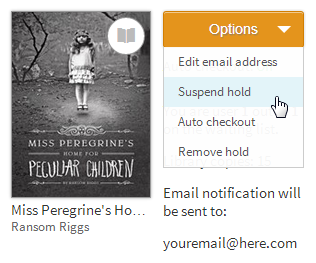
  3. Select Suspend hold from the Options drop-down menu next to the hold you'd like to suspend.
    Screenshot of the options drop-down menu for a title on hold
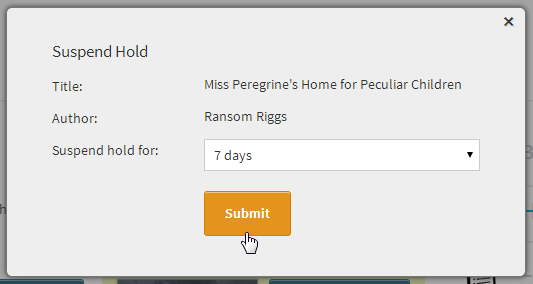
  4. Choose the number of days you'd like to suspend your hold (options are 7, 14, 21, 28, 60, or 90 days) then select Submit.
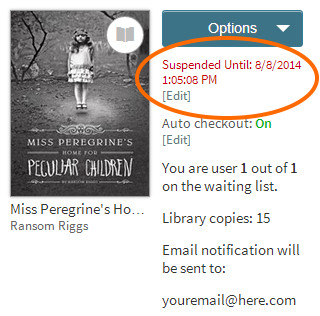
  5. Once you suspend a hold, you'll see a red notification next to the hold that shows how long it will be suspended. 
    Screenshot of the hold suspended notification on the holds page
6. If you change your mind, finish your other book early, or suddenly have more reading time than you expected, you can change or cancel your suspension by selecting [Edit].

Automatic Borrowing of Holds

Don't check your email enough?  Afraid you might miss a Digital Library hold notification? Get busy and can't always log in to the Digital Library within 72 hours?  Here's your answer.  The second new feature in the Digital Library is automatic borrowing of holds! 

Why: You don't want to miss a title you've been waiting for and end up back at the bottom of the holds list! 

How:
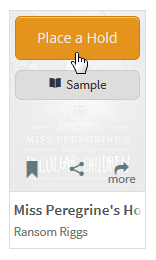
  1. Select Place a Hold to place an unavailable title on hold.
    Screenshot of the Place a Hold button
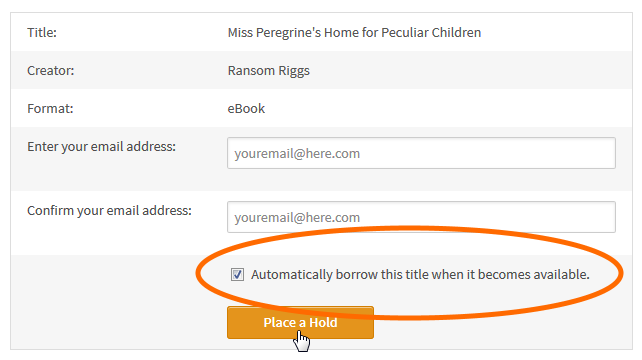
  2. In the pop-up that opens, make sure that "Automatically borrow this title when it becomes available" is selected.
    Screenshot of the automatic borrowing option on the hold form
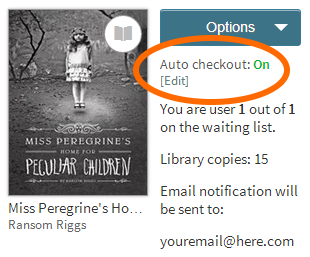
You can turn automatic borrowing on or off for any title you've placed on hold by visiting your Holds page and selecting the [Edit] link under "Auto checkout."
Screenshot of the auto checkout setting for a title on the holds page
You will receive an email each time a hold is automatically borrowed for you. You can find these borrowed titles on your Bookshelf under your account, ready to download or read in your browser.  
Note: If you've borrowed the maximum number of titles allowed by your library and one of your holds becomes available, you'll receive an email letting you know that automatic checkout could not be completed for that hold. In that case, you'll need to return a title or wait for one of your borrowed titles to expire, then manually check out your hold.
Sarah Hawkins, Resource Librarian

Monday, June 2, 2014

June is going digital! OverDrive Challenge, Big Library Read, and Audiobook Month

A recent Pew Research study showed that about 28% of Americans read an eBook last year. Of those 28%, only half know they can check out an eBook from their local library. We want to change that, and we need your help! 

OverDrive Challenge
For the month of June, OverDrive, East Central Regional Library's Digital Library vendor, is launching a promotional challenge to help raise awareness of library eBook lending across the world.  Our mission from June 1st-June 30th is to beat our previous record for monthly eBook and eAudiobook checkouts.

ECRL's best month on record?  The number to beat?  Our current monthly record is 5,031 digital library checkouts (March 2014).

Your Goal: checkout as many eBooks and eAudiobooks in June as you can!

Our Goal:
  • Increase checkouts by 25% from March 2014 (6,289 checkouts) to earn $1,500 credit to purchase new digital library titles
  • Increase checkouts by 50% from March 2014 (7,547 checkouts)  to earn $2,500 credit to purchase new digital library titles
  • Be the participating library with the highest percentage increase to receive a grand prize Gadget Jackpot!

For the month of June, every eBook and eAudiobook you check out counts toward our goal!  Get started now!


Big Library Read
You've joined us in 3 previous Big Library Reads.   Now, it's time to join us for the 4th Big Library Read with Laurien Berenson’s murder-mystery A Pedigree to Die For.  
Big Library Read creates a "global book club" connecting readers around the world who read the same eBook at the same time.  From June 3-18, 2014, thousands of libraries are able to lend A Pedigree to Die For eBook to millions of users simultaneously for free.    

To borrow A Pedigree to Die For, simply log in to ECRL’s Digital Library. You’ll see the title on the home page ready to checkout.  For the two weeks of the program, there's never a waiting list!

Get involved even more! 
Audiobook Month
Still need some inspiration to get started with ECRL's Digital Library?  June is Audiobook Month, a month dedicated to celebrating the joys of audiobook listening and promoting the value of audiobooks as a beneficial learning tool supporting literacy and education.  Get started listening by taking a look at our newest eAudiobooks.

Help us---help you!  Let’s work together to get the word out about East Central Regional Library's digital collection in our communities.

Sarah Hawkins, Resource Librarian

Friday, May 16, 2014

SYNC eAudiobooks are back!


East Central Regional Library is participating in SYNC and you are invited to join us!  In April 2014, 751 eAudiobooks were checked out from East Central Regional Library's Digital Library.  Now, see what everyone is listening to and get the young adults in your life listening to eAudiobooks by joining SYNC!

SYNC is a program that gives away two complete eAudiobook downloads–a current Young Adult title paired thematically with a Classic title–each week to listeners ages 13+ each summer.  In 2014, 26 titles will be given away over 13 weeks from May 15th- August 20th. 

Titles are delivered through OverDrive Media Console, the same software/app you already use to access eBooks and eAudiobooks from ECRL’s Digital Library. If you don’t already have OverDrive Media Console you can download it here:  http://omc.overdrive.com/.  The titles are all in MP3 format, are Windows and Mac compatible, and are supported on most listening devices.

Each SYNC eAudiobook will be available for download for a period of 7 days, and once downloaded, they are yours to keep (i.e. never expire and can be listened to at any time).


The first week’s young adult title is WARP: THE RELUCTANT ASSASSIN by Eoin Colfer and the first week’s classic title is THE TIME MACHINE by H.G. Wells.  They are available for download now through May 21st. Check out the complete SYNC 2014 Summer lineup here: http://www.audiobooksync.com/sync-schedule/

Afraid you’ll miss a week? You can get text message alerts when the next SYNC eAudiobooks are available by texting syncya to 25827. You can also receive reminders by signing up for the email newsletter or by following the SYNC blog here: http://www.audiobooksync.com/about/what-is-sync/

The SYNC program is a great way to introduce young adults to eAudiobooks!  SYNC is dedicated encouraging literacy and introducing the listening experienc to young adults, a goal shared with East Central Regional Library.  So SYNC some young adult and classic literature into your earphones this summer!  And don’t forget about the other eAudiobooks ECRL offers year-round via our Digital Library.  


Sarah Hawkins, Resource Librarian


*SYNC is sponsored by AudioFile Magazine and titles are delivered through OverDrive Media Console.

Monday, March 31, 2014

DISCONTINUED: OverDrive Media Console for BlackBerry

BlackBerry was once king of the smartphone world.  For 4 years, it reigned supreme, until their world was eclipsed by the rise of Apple’s iPhone and Google’s subsequent introduction of Android.
In the past year, the OverDrive Media Console app for BlackBerry has experienced a steady decline in downloads. Only .3% of all visitors to digital library websites come from a BlackBerry device.  After much consideration, OverDrive, East Central Regional Library's Digital Library vendor, has decided to remove the app from BlackBerry App World in order to focus development efforts on more widely used platforms such as iOS and Android—both of which have more daily downloads than BlackBerry has monthly.
Effective April 10, 2014, the OverDrive Media Console mobile app for BlackBerry will no longer be available for download to BlackBerry, BlackBerry 10, and Playbook devices.  
BlackBerry users with the app installed prior to April 10, 2014 will be able to continue downloading eBooks and audiobooks via OverDrive Media Console. However, no further development or testing will be dedicated to it.
New BlackBerry users will still be able to download the Kindle app for BlackBerry and download Kindle format eBooks from ECRL's Digital Library.
If you have questions, please let us know.  
Sarah Hawkins, Branch Librarian, Chisago Lakes Area Library

Friday, October 18, 2013

NOW AVAILABLE: Renew your eBooks & eAudiobooks in Overdrive!

The much anticipated feature of renewing eBooks & eAudiobooks on ECRL's Digital Library is now available!

Here's how it works:

The option to renew a title becomes available three days before the title is set to expire, appearing next to the title on your Bookshelf under your library Account on the Digital Library website. (Note:  NOT THE APP)

There is a limit of 1 renewal per checkout.
  1. Log into your library's digital collection website and navigate to your Account.
  2. On your library Bookshelf, select the Renew icon next to the title you'd like to renew.
    Note: This option does not appear until three days before the title is supposed to expire.
    If there isn't a waiting list for a title, the Renew icon will be green.  In this case, you can then borrow the title again immediately once your first checkout expires.
    Screenshot of the renew icon for a title with no existing holds
    If there is a waiting list for a title, the Renew icon will be grayed out. In this case, you can still use the renew feature to put yourself back on the waiting list.
    Screenshot of the renew icon for a title with existing holds
  3. Enter and confirm your email address, then click the Renew button.
    Screenshot of the renewal form
Once a title has successfully been renewed, its Renew icon on your library Bookshelf will have a green checkmark next to it.
Screenshot of the renew icon once a title has already been renewed
You can also track which titles you've renewed from your Holds page.

Here's what's different.  Your expiration date won't change on your Bookshelf after you renew an item until your first checkout period expires. If the title is available for you to borrow again, you will receive an email notification. Click the link in that email or go to your Holds list to check out the title again.

YOU HAVE TO DOWNLOAD THE TITLE AGAIN.  Then your expiration date will change to reflect your renewal.

(Info taken from Overdrive's Help page: How to renew digital titles).

Sarah Hawkins, Branch Librarian, Chisago Lakes Area Library

Monday, September 16, 2013

2nd Big Library Read

East Central Regional Library is participating in the second Big Library Read and you are invited to join us!  Join the global movement of passionate readers and library patrons who support the access of eBooks and eAudiobooks through your local library. 

With the success of the first Big Library Read, OverDrive, HarperCollins Publishers, and author Jane O’Connor, have partnered up to present the next Big Library Read, this time with a juvenile title.  More than 6,500 libraries worldwide are participating!   Kids and fans who grew up with Jane O’Connor’s Fancy Nancy picture books will be especially thrilled.  They can spend some more quality time with their BFF: Nancy Clancy is now starring in her own chapter books!
The Big Library Read title, Nancy Clancy, Super Sleuth, is the first in the Fancy Nancy: Nancy Clancy juvenile chapter book series and is available in both eBook and eAudiobook!


"Nancy Clancy, Super Sleuth brings us back to the glamorous world of our favorite fancy girl. Nancy may be a bit older and more sophisticated, but she hasn’t lost her love for fancy words, outrageous fashion and dramatic flair. She and her best friend Bree have everything they need to solve a mystery, from their totally professional trench coats to their top-secret code. But when crime strikes in their classroom, will these super sleuths be able to crack the case?"
Jane O’Connor’s Nancy Clancy titles are great for young readers who are learning how to read and developing a love of literature.  Her use of advanced vocabulary, while explaining what the words mean, helps children grow as readers.  Checking out the eBook and eAudiobook together will enable children and parents to listen to the title as they follow along with the text.

Remember, the especially unique aspect about Big Library Read is that, for the duration of the program, September 16th-September 30th, 2013, the eBook and eAudiobook will not follow the traditional one copy/one user model but will simultaneously be available to all ECRL eBook & eAudio users to borrow via our Digital Library.  No wait lists!  The eBook is available in the OverDrive Read, Kindle, and Adobe EPUB formats.  The eAudiobook is available in MP3 and WMA formats.  Being available in all major formats also guarantees Nancy Clancy: Super Sleuth will be accessible for every Digital Library user on all major devices.

Big Library Read creates a "global book club" which allows parents and children to read together and join thousands of other users in reading the same book at the same time!  To borrow Nancy Clancy, Super Sleuth, simply log in to ECRL’s Digital Library. You’ll see the title on the home page ready to checkout.

In addition to creating a global “library book club,” Big Library Read demonstrates the positive exposure and sales influence library eBooks provide to authors and publishers.   The proof is in the numbers!  For less than 3 weeks in May 2013, during the first Big Library Read, 63 East Central Regional Library patrons checked out and downloaded The Four Corners of the Sky by Michael Malone via our Digital Library.  Globally, users checked out Four Corners of the Sky more than 44,000 times during that same time.  Additionally, Malone’s other titles experienced a sales increase, and checkout rate growth of more than 100%. 

If you’d like to be an even more active Big Library Read participant, join a Facebook chat with Jane O’Connor on Tuesday, Sept 24th at 8 pm (CT).  You’ll be able to ask Jane anything burning questions about her writing process, Nancy Clancy, or what she has in store next.  You can also join the conversation on Twitter during this event by following @ecrlib and/or using the hashtag  #BigLibraryRead.

Sarah Hawkins, Branch Librarian, Chisago Lakes Area Library


Monday, August 26, 2013

New version of Overdrive Media Console app (3.0)

OverDrive Media Console v3.0 has been released for Android and iOS (iPhone, iPad, iPod touch) users.  This update has some of the “most requested” features by patrons using the Overdrive Media Console app across the world! 


OMC v3.0 has been completely redesigned with a focus on the user experience.  The app has an all-new look, with easier navigation using taps and swipes.  Watch a video preview of OMC v3.0 here now!

When you first open OMC v3.0, you will see a new start screen prompting you to add a library, add books to your bookshelf, and create an Adobe ID, complete with visuals to point you in the right direction!  Once this is done, more tutorial screens will walk you through the new interface, showing up when you go to your bookshelf or open an eBook. Each tutorial screen shows up once, but is available again using the option in Settings to show tutorials next time the app is started.

New Features of Next Generation Overdrive Media Console:

-History-a list of titles that have been deleted or returned  This allows you to keep track of the titles you have read – options range from the last 10 deleted titles to the last 100 deleted titles.

-Home Menu-your 1-stop for navigating the app. From there, you can access My Libraries, Bookshelf, Settings, History, OverDrive One and more. To access, swipe from the left of your screen while in the app.

-In-app help- access app help from the new Home Menu.

-Book menu-Allows for simpler navigation within the book, providing access to the table of contents, book details, and editable bookmarks.  To access, swipe from the right of your screen while in the app.

-OverDrive One- an opt-in registration service that gives users the ability to sync bookmarks and reading progress across multiple devices.  Stop reading a book on your iPad, pick up your Android smart phone, and start reading exactly where you left off!

-Variable eAudiobook speed playback for iOS users. Slow your listening down to ½ speed or speed it up to 2x’s as fast!  (Not available for Android users)


Other Changes:  Bookshelf- Titles you have downloaded in your app now display differently.  You will see tiled covers of the books, as well as easier expiration date visibility.  To return a title from your bookshelf, you tap and hold on the jacket cover.  This will bring up the options to return, delete, or share the title.  As before, to remove a title from your library account, you must return not delete.

OMC v3.0 requires: Android OS v4.0 (or newer) for Android devices and iOS 6 (or newer) for iOS users. Older versions of OMC will remain available for download for users who have older operating systems.  (To find your operating system: On an iOS device tap Settings > General > About.  On an Android phone tap System Settings > About phone.  On an Android tablet tap System Settings > About tablet.)

Users will be prompted to install the new version.  These changes will not take place until users update their app. Overdrive will continue to support older versions of OMC.  If you wish not to update your app, it will continue to work as it always has.

For more info and to help you navigate the changes, the help articles and videos from Overdrive have been updated. 

Sarah Hawkins, Branch Librarian, Chisago Lakes Area Library